

Repository F# setup
open System
open System.IO
open System.Threading
open System.Threading.Tasks
open Axial
open Axial.Layers
open Axial.Console
open Axial.FileSystem
open Axial.Hosting
open Axial.Hosting.Browser
open Axial.Hosting.Node
open Axial.PlatformService
open Axial.State
open Axial.Telemetry
open Axial.Telemetry.JavaScript
Get started
Before you begin
Install the .NET SDK 8.0 or later, then install Axial:
dotnet add package Axial
The smallest Flow
Put this in a project that references Axial, or save it as first-flow.fsx with #r "nuget: Axial" as the first
line and run dotnet fsi first-flow.fsx:
open Axial

let ready : Flow<string> =
    Flow.succeed "The application is ready."

let result = Flow.run () ready
printfn "%A" result
Axialready: Flow<string>FlowA flow that requires no environment and cannot fail with a typed error.
stringAn abbreviation for the CLI type . Basic Types
Axial.Flowsucceed: 'value -> Flow<'env,'error,'value>Alias for ok that reads well in some call sites. The value to wrap in a successful flow. A flow that always succeeds with the provided value. let result = Flow.succeed 42 |> Flow.run () // result = Success 42
result: Exit<string,Never>run: 'env -> Flow<'env,'error,'value> -> Exit<'value,'error>Runs the workflow and blocks until the final exit is available. The environment used by the workflow. The workflow to run. The final workflow exit. let exit = workflow |> Flow.run environment
printfn: Printf.TextWriterFormat<'T> -> 'TPrint to stdout using the given format, and add a newline. The formatter. The formatted result. See Printf.printfn (link: ) for examples.
The output is:
Success "The application is ready."
ready describes work; it has not started. Flow.run () is the edge that starts it. Flow<string> is the short
spelling for a Flow with no capabilities and no expected failure: Flow<unit, Never, string>.
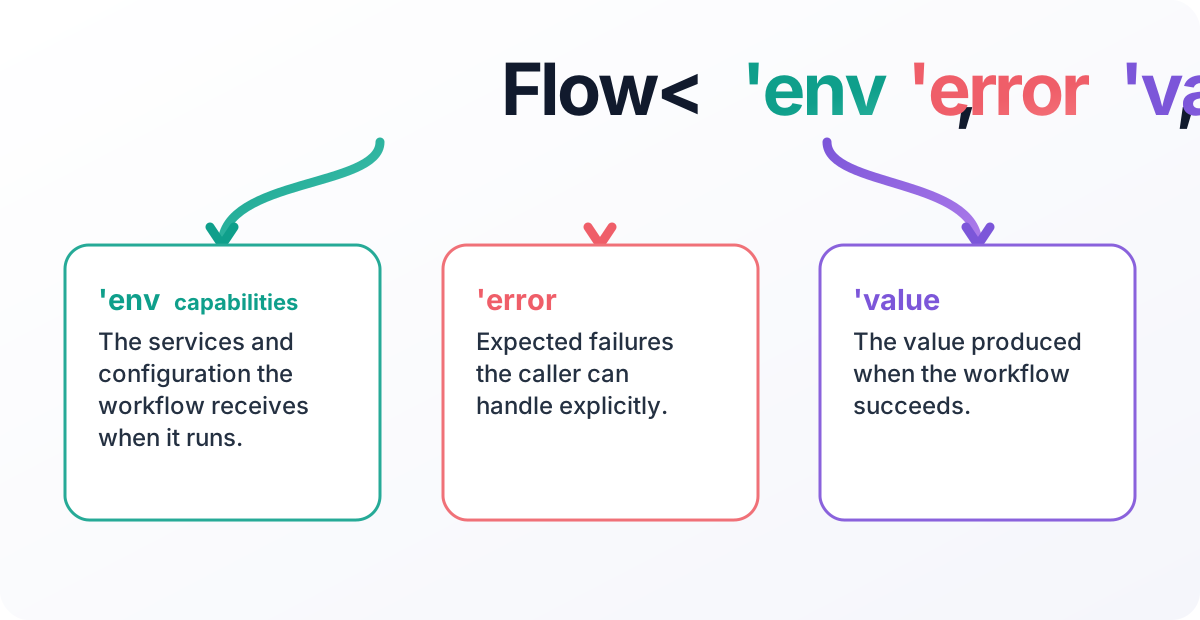
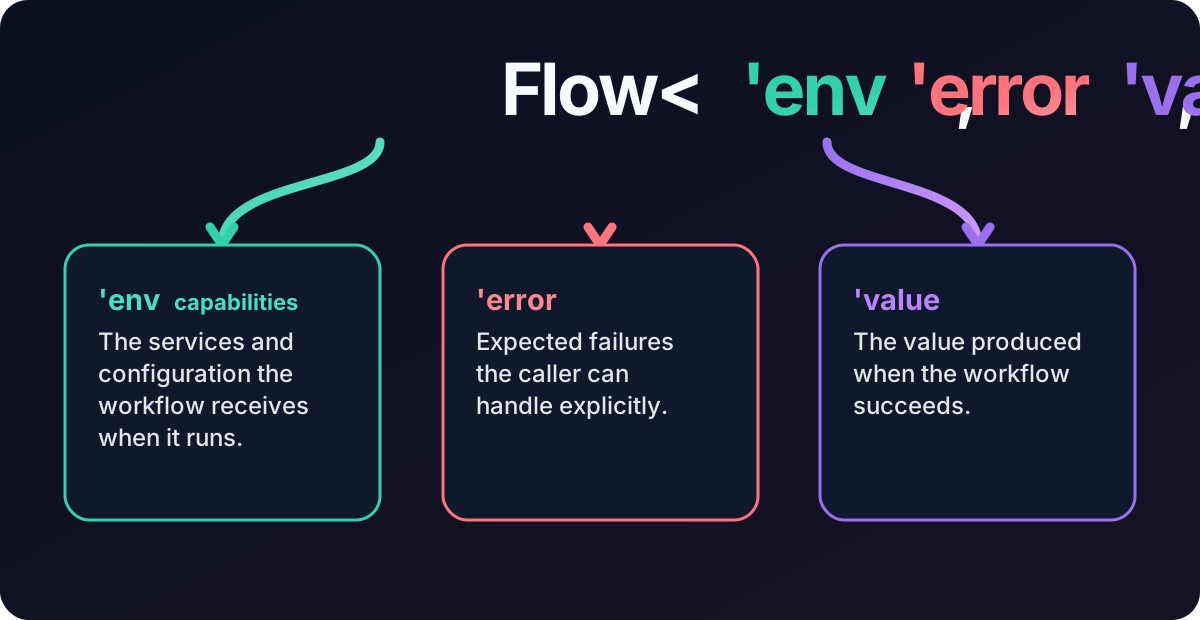
Here, unit means no capabilities and Never means no expected failure. A capability is a value the workflow is
allowed to use—usually a service dependency, but sometimes configuration or request context. Only string carries
information here, so the alias keeps the first signature uncluttered.
You do not need to carry those two empty slots around until the workflow needs them. The next example does.
A useful Flow: quote a price
Suppose the application already has an exchange-rate service. The service is ordinary application code: its live implementation might call an API, use a cache, or dispatch to another service. Axial does not construct it and does not need to know how it works.
The workflow names the one service it needs and turns the service's cancellable Task<Result<_, _>> operation into a
Flow:
open System
open System.Threading
open System.Threading.Tasks

type QuoteError =
    | RateUnavailable

type IExchangeRates =
    abstract UsdToAud : CancellationToken -> Task<Result<decimal, QuoteError>>

type QuoteApp =
    { ExchangeRates: IExchangeRates }

let quoteAud (usd: decimal) : Flow<QuoteApp, QuoteError, decimal> =
    flow {
        let! rates = Flow.envWith _.ExchangeRates
        let! rate = ColdTask rates.UsdToAud
        return Math.Round(usd * rate, 2)
    }
The type reads as a contract: quoteAud needs QuoteApp, can fail with QuoteError, and otherwise returns a decimal.
The caller does not pass a cancellation token; ColdTask receives the one owned by the Flow runtime and gives it to
the service.
At the host edge, build the small capability record from services the application already owns:
let quoteApp (services: IServiceProvider) : QuoteApp =
    { ExchangeRates = services.GetRequiredService<IExchangeRates>() }

let exit = quoteAud 80m |> Flow.run (quoteApp services)
That is not a second dependency-injection system. It is the explicit value passed to the workflow boundary. In a
test, supply an IExchangeRates test implementation; in production, resolve the application's registered
implementation. The workflow remains exactly the same.
What's next
- Why Flow? explains when this model earns its cost and when
ResultorTaskis still the right answer. - Installation and packages covers the package map.
- Add Axial to an existing Task application shows the one-module adoption path.
- Your first application runs a Flow as an application root.
- Creating and running flows covers the full construction and execution surface.
- Expected errors and defects explains the error channel and defects.
- Dependencies, services, and layers scales the environment record up.